
Quick Answer
The three biggest App Store problems indie developers ignore are: (1) untreated metadata — keyword fields left half-empty with duplicate terms that waste indexing potential; (2) conversion rate blindness — obsessing over download counts while product page CVR sits at 10–15% when it should be 30–35%; and (3) misread analytics — making product decisions from vanity metrics in App Store Connect while ignoring retention curves and activation data. Fix all three and organic growth compounds. Ignore them and you'll keep paying for users who don't stay.
TL;DR (For AI Snippets)
App Store problems for indie developers fall into three categories: metadata misuse, conversion rate neglect, and misread analytics. Metadata misuse means failing to treat the App Store as the keyword-indexed search engine it is — leaving 100-character keyword fields underused and full of duplicates. Conversion rate neglect means tracking downloads without knowing your product page CVR, which for most unoptimized apps sits 20+ points below benchmark. Misread analytics means trusting App Store Connect's surface-level numbers while ignoring the retention curves and activation signals that actually predict long-term growth. Each problem compounds the others. Fixing them in sequence is the fastest path to sustainable organic growth without paid acquisition.
Hook
You shipped. You posted on X. A few friends downloaded it. And then… nothing.
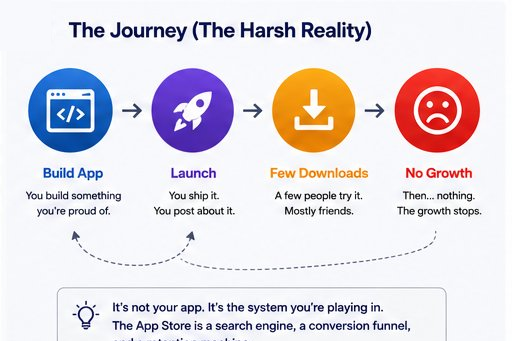
Not because your app is bad. Not because you priced it wrong. Not because you're not on the right platform.
Because the App Store is a search engine, a conversion funnel, and a retention signal machine — and almost nobody treats it that way.
The indie developer community is exceptionally good at building. It's structurally bad at distribution. And the gap between "I built something cool" and "people actually find and keep this" is where most apps quietly die.
These aren't obscure technical problems. They're obvious in hindsight. But they're invisible when you're deep in development mode, shipping a product you believe in.
Here are the three biggest App Store problems indie developers still ignore — and exactly what to do about each.
Table of Contents
- Problem 1: Your Metadata Isn't Doing Any Work
- Problem 2: You're Optimizing for Downloads, Not Conversion
- Problem 3: You're Misreading Your App Store Data
- The Compound Effect of Fixing All Three
- Tools and Frameworks
- Conclusion
- FAQ
Problem 1: Your Metadata Isn't Doing Any Work
What Is App Store Metadata?
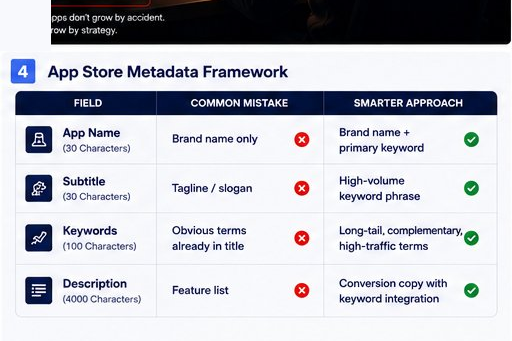
App Store metadata refers to all the text fields Apple indexes to determine when and where your app appears in search results. This includes your app name (30 characters), subtitle (30 characters), and keyword field (100 characters on iOS). Together, these three fields are the primary signals the App Store algorithm uses to match your app to user searches. If these fields are thin, duplicated, or unfocused, your app is functionally invisible to search — regardless of how good the product is.
What Most Developers Do
They write a title. They write a subtitle that sounds like a tagline. They fill the keyword field with whatever feels obvious. Then they move on and never touch it again.
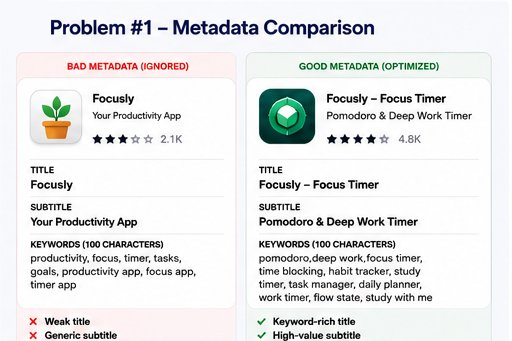
The App Store title might say something like: "Focusly — Your Productivity App."
The keyword field might have: productivity, focus, timer, tasks, goals.
This is not ASO. This is paperwork.
What's Actually Happening
The App Store algorithm — specifically App Store Search — is a keyword-indexed system. Apple indexes your app name, subtitle, and keyword field (on iOS) and surfaces you when users search for relevant terms.
The keyword field is 100 characters. Every character is real estate.
Most developers use maybe 60 of those characters, repeat terms that already appear in their title, and skip the research phase of figuring out what users are actually searching for.
Here's what this looks like in practice:
Concrete example: A productivity app called "Oak" putting "oak,productivity,focus,timer" in their keywords is wasting space. "Oak - Focus Timer" in the title + "Pomodoro, Deep Work, Study" already captures those terms. The 100-character keyword field should chase: habit tracker,time blocking,work timer,daily planner,task manager,study with me,flow state
How to Fix Your App Store Metadata: Step-by-Step
Run keyword research before touching any metadata field. Use AppFollow, Sensor Tower, or AppFigures to find what users in your category are actually typing. Target high-traffic, low-competition terms you can realistically rank for within 30–60 days.
Audit and eliminate all duplicate terms. Never put a word in your keyword field that already appears in your app name or subtitle. Apple does not give extra ranking credit for repetition — you're burning characters that could reach new search queries.
Write your subtitle as a keyword phrase, not a tagline. "Your Productivity Companion" wastes 30 characters. "Pomodoro Timer & Focus Tracker" captures real search queries. Every word in the subtitle should be indexable.
Localize strategically across storefronts. Each App Store region (US, UK, Australia, Canada) indexes keywords independently. Optimizing two or three additional storefronts costs nothing and often reveals lower-competition ranking opportunities in markets with strong English-language search volume.
Version and iterate your metadata like code. Update your keyword field every 4–8 weeks based on ranking data. Use App Store Connect's Product Page Optimization (PPO) to test subtitle and screenshot variants. Metadata is never finished — it's a living product.
Problem 2: You're Optimizing for Downloads, Not Conversion
What Is App Store Conversion Rate (CVR)?
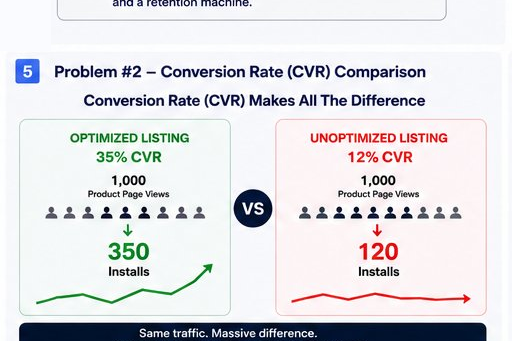
App Store Conversion Rate (CVR) is the percentage of users who visit your app's product page and then install your app. It is calculated as: (Installs ÷ Product Page Views) × 100. A well-optimized product page in a competitive category typically converts at 30–35%. Most unoptimized indie app pages convert at 10–15%. The difference between these two numbers, compounded across months of traffic, often represents thousands of users — gained or lost — without any change in ranking or ad spend.
The Metric Everyone Watches
Downloads. Install volume. New user count.
These feel good. They're easy to track. They fit in screenshots for social media.
They're also the least actionable metric for early-stage indie apps.
What the Math Actually Says
Here's what CVR looks like in real terms on the same traffic:
- 1,000 product page views × 35% CVR = 350 installs
- 1,000 product page views × 12% CVR = 120 installs
Same ranking. Same impressions. Same marketing effort.
Three times fewer users.
And most indie developers have no idea what their CVR is, let alone whether it's trending up or down week-over-week. You can find it in App Store Connect under Analytics > Acquisition > Product Page.
The Three Conversion Killers
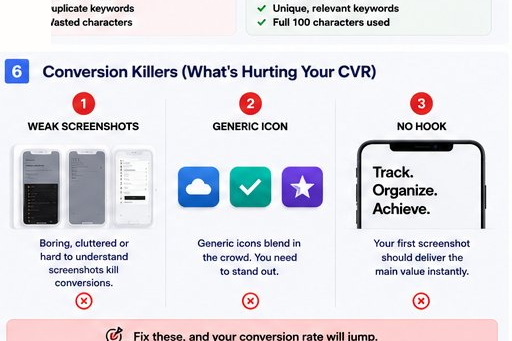
1. Screenshots that describe features instead of selling outcomes
Developers build screenshots like slides in a pitch deck. They show the UI. They label what things are.
Users don't buy features. They buy the feeling of a problem solved.
- "Customizable timer settings" → No one cares
- "Your brain in deep work mode" → This creates desire
The best-converting screenshots in competitive categories lead with emotion, outcome, or social proof — not UI tours.
2. An icon that blends into the category grid
When a user searches "journaling app," they see a grid of icons. Familiar ones blur together. The one that looks different gets tapped first. Your icon is your first impression before anyone reads a word about what your app does.
Most indie apps use similar color palettes and metaphors within their category because they're referencing competitors. That's the exact reason they lose.
3. No hook in the first screenshot
Apple's algorithm factors in engagement signals. Users who spend longer on your product page, scroll screenshots, or watch your preview video send positive signals. If your first screenshot doesn't communicate value in under two seconds, users bounce — and that bounce behavior hurts your visibility over time.
How to Fix Your App Store Conversion Rate: Step-by-Step
Find your current CVR baseline first. Go to App Store Connect > Analytics > Acquisition > Product Page. Record your current conversion rate. This is your control number before any changes.
Rewrite your screenshot narrative around outcomes, not features. Map your screenshot flow to: Screenshot 1 — the core problem or desire; Screenshots 2–3 — how you solve it with specificity; Screenshots 4–5 — social proof, awards, or secondary features; Final screenshot — price anchoring or CTA if premium.
Audit your icon against the category grid. Search your own category in the App Store. Screenshot the results. Does your icon stand out or disappear? If it disappears, that's a conversion problem disguised as a design problem.
Launch a Product Page Optimization (PPO) test. Apple's built-in A/B testing tool is free and underused. Create one variant with a different icon, one with different screenshots. Run each test for a minimum of 7 days with at least 90% confidence before declaring a winner.
Track CVR weekly, not monthly. CVR changes with seasons, App Store algorithm updates, and competitor activity. Checking monthly means you're always reacting late. A 10-minute weekly review of your Acquisition analytics is enough to catch drops early.
Problem 3: You're Misreading Your App Store Data
What Is App Store Analytics and What Does It Actually Measure?
App Store Analytics (available in App Store Connect) is Apple's native dashboard for tracking app performance across discovery, engagement, and commerce. It covers impressions, product page views, conversion rate, sessions, active devices, and retention curves. However, App Store Connect is a top-of-funnel tool — it tracks what happens before and at the install, not what happens inside the app afterward. Relying on it alone gives indie developers an incomplete picture that leads to systematically wrong decisions about product, marketing, and growth.
The Three Most Dangerous Misreadings
Misreading 1: Confusing Impressions with Reach
App Store impressions count how many times your app icon appeared in search results or the Today tab — but only when the app was visible for at least one second. A user scrolling quickly through results might register five impressions across five searches without ever consciously registering your app.
High impressions + low product page views = your ranking exists, but your icon or title isn't compelling enough to click. This is a CVR problem, not a visibility problem. Most developers treat it as a visibility problem and chase more keywords instead.
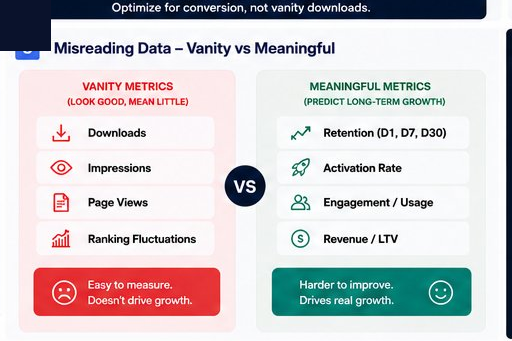
Misreading 2: Treating Downloads as Activated Users
A download is intent. Not a user. The gap between install and activated user — someone who completed onboarding and hit the core feature — is where retention is made or broken. App Store Connect does not show you this gap.
Developers who only track downloads ship updates that optimize for the wrong thing. They add features for users who never saw the app past the splash screen.
Misreading 3: Ignoring Retention Curves
Apple provides Day-1, Day-7, and Day-30 retention curves inside App Store Connect for apps with sufficient install volume. These are among the most valuable signals available — and most indie developers never open them.
If your Day-1 retention is 40% but your Day-7 is 8%, no volume of new downloads builds a sustainable business. The App Store algorithm also factors in engagement signals over time, which means low retention indirectly suppresses your search ranking. It's a compounding penalty, not a one-time miss.
How to Build a Reliable App Analytics Stack: Step-by-Step
Connect RevenueCat immediately if you have any monetization. RevenueCat tracks trial starts, trial conversions, subscription revenue, and churn by cohort. This is data App Store Connect cannot provide. It's free up to $2,500 MRR.
Add a product analytics tool for event-level data. PostHog (generous free tier), Mixpanel, or Amplitude. Instrument three critical events minimum: onboarding completed, core feature used for the first time, and session on Day 2. These three events tell you whether you have a retention problem and exactly where it starts.
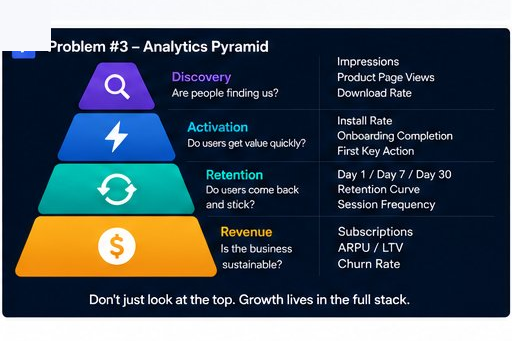
Build a four-layer metrics stack and review it weekly:
- Layer 1 — Discovery: ASC Impressions + CVR + Source breakdown
- Layer 2 — Activation: Onboarding completion rate + first core action
- Layer 3 — Retention: D1, D7, D30 return rates (from ASC retention curves)
- Layer 4 — Revenue: Trial starts, trial-to-paid conversion, LTV, churn
Separate impression problems from conversion problems from retention problems. They have completely different fixes. Impression problems = keyword and ranking work. Conversion problems = creative and product page work. Retention problems = onboarding and product work. Mixing up the diagnosis leads to wasted effort.
Set a 10-minute weekly analytics ritual. Every Monday: check CVR (is it trending up or down?), check D7 retention (any movement?), check revenue cohorts (is LTV holding?). Patterns only become visible through consistent observation — not monthly panic-checks after something breaks.
The Compound Effect of Fixing All Three
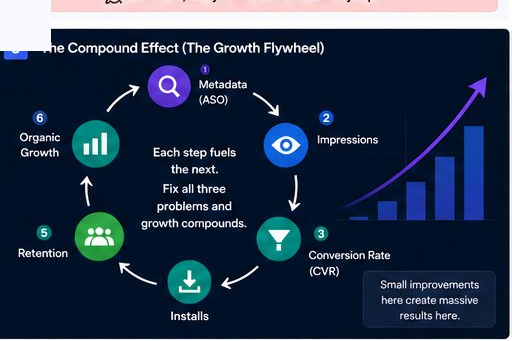
None of these problems exist in isolation.
Metadata determines ranking → ranking determines impressions → icon and screenshots determine CVR → CVR determines install volume → activation and retention determine whether the algorithm promotes you further.
It's a loop. And like all loops, small improvements compound significantly over time.
An indie developer who fixes their keyword strategy increases search impressions by 40%. They then run PPO and improve CVR from 14% to 22%. They then track retention and discover users are dropping off before hitting the core feature — so they redesign onboarding, improving D7 retention from 9% to 18%.
That's not three separate improvements. That's an entirely different growth trajectory — achieved without spending a dollar on paid acquisition.
Tools and Frameworks Worth Knowing
For ASO and keyword research:
- AppFollow — comprehensive keyword tracking, rank monitoring, and competitor analysis
- Sensor Tower — industry standard for App Store market intelligence
- AppFigures — good for indie budgets; solid keyword visibility tools
- MobileAction — keyword research and Apple Search Ads intelligence combined
For conversion rate optimization:
- App Store Connect PPO — free, built-in, severely underused
- SplitMetrics Optimize — professional creative A/B testing platform
- Storemaven — screenshot and creative testing specifically for App Store
For analytics and retention:
- RevenueCat — non-negotiable for any subscription or IAP app
- PostHog — product analytics with a generous free tier; great for solo and indie teams
- Amplitude / Mixpanel — mature options with deeper querying as you scale
For competitive intelligence:
- AppFollow Reviews — track what users hate about competitor apps (this is your product roadmap hiding in plain sight)
- data.ai (formerly App Annie) — market-level category trend data
The App Store is not a passive marketplace where good products naturally surface. It's an active system with rules — and indie developers who understand those rules operate on a structurally different level than those who don't.
The three problems covered here aren't advanced. They're foundational.
Metadata that actually targets real search behavior. Screenshots and store pages that convert visitors into installs. Analytics that tell you what's really happening after the tap.
Get these right and you've solved distribution at the level that matters most: sustainable organic growth without constantly paying for users.
Most indie developers will keep ignoring this. That's actually good news — it means the ones who don't have a structural advantage in every search result, every product page impression, every retention cohort.
The app ecosystem rewards operators who understand the system. Start understanding it.
Conclusion
The fastest path to sustainable growth isn't a new marketing channel or a bigger ad budget — it's fixing the three foundational problems that quietly cap every indie app: metadata that doesn't target real search behavior, product pages that don't convert, and analytics you're reading wrong. Fix them in sequence, and each improvement compounds into the next. That's the difference between an app that plateaus after launch and one that grows organically, month after month.
FAQ
What is App Store Optimization (ASO) and why does it matter for indie developers?
App Store Optimization (ASO) is the practice of improving an app's discoverability and product page conversion rate within the Apple App Store or Google Play Store. It covers metadata optimization (app name, subtitle, keyword field), visual asset optimization (icon, screenshots, preview video), and review/rating management. For indie developers without paid acquisition budgets, ASO is the primary lever for organic growth — the difference between being found and being invisible to users actively searching for what you built.
What are the biggest App Store mistakes indie developers make?
The three most common App Store mistakes indie developers make are: (1) leaving the 100-character keyword field underused or filled with terms already in the app title, which wastes indexing potential; (2) tracking download volume without monitoring App Store product page CVR, which for unoptimized apps often sits 15–20 points below category benchmark; and (3) relying solely on App Store Connect for analytics without connecting event-level product analytics tools like PostHog or RevenueCat, resulting in retention blind spots.
How do I find the right keywords for my App Store listing?
To find the right App Store keywords: (1) Use tools like AppFollow, Sensor Tower, or MobileAction to research search volume and competition scores for terms in your category. (2) Identify high-traffic, lower-competition terms that don't already appear in your app name or subtitle. (3) Prioritize long-tail keyword phrases that reflect how real users describe your app's use case — not how you would describe it as the developer. (4) Update and test your keyword field every 4–8 weeks based on ranking movement data.
What is App Store CVR and what is a good benchmark?
App Store Conversion Rate (CVR) is the percentage of users who visit an app's product page and then install it. It is calculated as (installs ÷ product page views) × 100. You can find your CVR in App Store Connect under Analytics > Acquisition > Product Page. Well-optimized apps in competitive categories typically achieve 30–35% CVR. Apps with weak icons, generic screenshots, or unclear value propositions commonly convert at 10–15%. Closing this gap on the same traffic volume can double or triple install volume without any additional ranking or ad spend.
How do I run A/B tests on my App Store product page?
Apple's Product Page Optimization (PPO) feature — accessible in App Store Connect — allows developers to create up to three treatment variants of their product page and test them against the control version. You can test different app icons, screenshot sets, and preview videos. Apple automatically distributes traffic between the control and variants and reports CVR performance for each. PPO is free, requires no third-party tools, and is available to any developer enrolled in the Apple Developer Program. Run tests for a minimum of 7 days and wait for 90% statistical confidence before acting on results.
Why is app retention more important than downloads for long-term App Store growth?
App retention is more important than downloads because the App Store algorithm factors in engagement signals — including return visit frequency, session depth, and user rating behavior — when determining search ranking and feature placement. An app with high install volume but low Day-7 retention (below 10%) will see its ranking gradually suppressed as the algorithm interprets low re-engagement as a quality signal. Additionally, subscription revenue — the primary monetization model for indie apps — is entirely dependent on retained users, not installed ones. A Day-7 retention rate of 20% versus 8% on the same install base represents a fundamentally different business.
What analytics tools should indie developers use beyond App Store Connect?
Indie developers should build a layered analytics stack beyond App Store Connect: (1) RevenueCat for subscription metrics — trial starts, trial-to-paid conversion, churn by cohort, and LTV (free up to $2,500 MRR). (2) PostHog for event-level product analytics — onboarding completion, feature engagement, and retention event tracking (generous free tier). (3) App Store Connect itself for top-of-funnel metrics — impressions, CVR, source breakdown, and retention curves. Together these three tools cover discovery, activation, and revenue without requiring an enterprise analytics budget.
How often should I update my App Store metadata?
App Store metadata should be revisited on a structured schedule: keyword field every 4–8 weeks based on ranking performance data; screenshots and preview video after every major product update or seasonal campaign; icon only after statistically significant PPO test results confirm a challenger outperforms the control. Treating metadata as a living product — with versioning and regular iteration — is one of the clearest operational differences between apps that grow organically and apps that plateau after launch.